Account & Billing
Account & Billing
Sign-in, the account menu, what your subscription allows, and the grace period.
Last updated 2026-10-08 · Applies to NotBot 1.4.4+
NotBot signs in to your MellowState account and checks your subscription before it prints. This page covers sign-in, the account menu, what your subscription allows, and what happens when NotBot cannot reach us.
Your account
You can create a MellowState account with:
- email and password
- Apple
Keep signing in the way you created the account. One subscription is per person or per company and covers all your shops, so several Whatnot accounts do not need separate NotBot subscriptions. To manage or cancel your subscription on the website, see Manage or cancel your subscription.
Signing in
Click Login to Continue. Your web browser opens the MellowState sign-in page, so you can use saved passwords and your Google or Apple sign-in. Once you approve, the browser hands you back to NotBot, which stays signed in across restarts. See Sign in to NotBot.
Your sign-in is kept in your computer's secure credential storage. If that storage is locked or unavailable, NotBot keeps the sign-in in a local file instead and warns you, so you can fix the storage.
NotBot keeps your session fresh in the background. If your sign-in expires or your subscription ends, NotBot asks you to sign in again.
The account menu
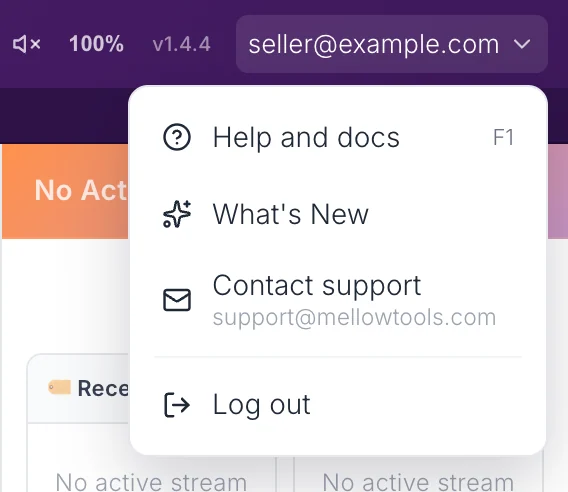
Your email at the top right of NotBot opens the account menu:
- Help and docs (F1): opens these docs in a NotBot tab.
- What's New: what changed in recent versions.
- Contact support: opens a new email to support@mellowtools.com in your mail app.
- Log out: signs NotBot out. You need to sign in again to use it.
What your subscription allows
Printing needs NotBot access on your account and an active or trial subscription.
- If your account has no NotBot access, NotBot shows Access Revoked with a way to subscribe.
- If your subscription is not active, NotBot keeps recording your show but does not send labels to the printer, and asks you to sign in again. Labels wait until your subscription is active.
When NotBot cannot reach us
If the subscription check fails because your internet or our service is down, NotBot does not cut you off. It enters a grace period:
- printing keeps working normally;
- a warning icon appears next to your email at the top right; hover it to see how much time is left;
- NotBot keeps trying to refresh your session in the background.
This way a shaky connection during a show does not stop your printer. If your sign-in is actually invalid (not only unreachable), there is no grace period: NotBot asks you to sign in and stops printing.
Failed payments
If a subscription payment fails, the subscription becomes inactive and NotBot stops printing at its next check. Retries for failed payments are handled by our billing system, not by NotBot. Check your billing page on the website, or contact support, about a specific payment.
See also
- Getting Started for the first-run flow.
- Updates for how NotBot updates.
- Privacy for what NotBot stores and sends.